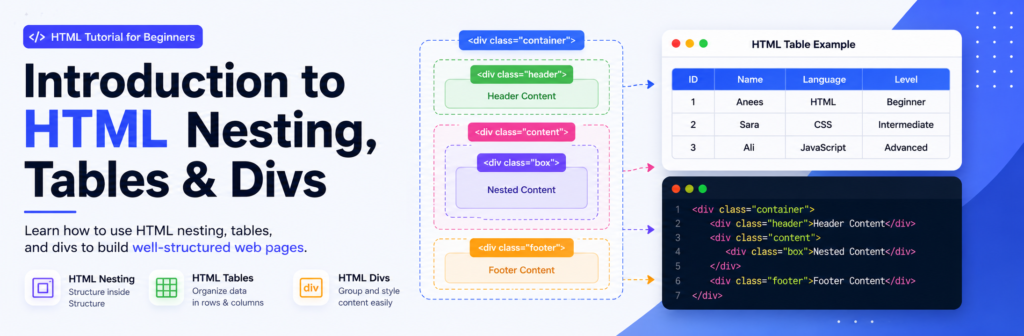
Introduction
You will learn tables to organize tabular data and <div> elements to group and structure content.
What You Will Learn
- How HTML elements are nested inside other elements.
- How to properly open and close nested HTML tags.
- How to create tables using
<table>,<tr>,<th>, and<td>. - How to use
<div>elements to group webpage content. - Common mistakes beginners should avoid when working with nesting, tables, and divs.
Tables
The HTML <table> element allows web authors to display tabular data (such as text, images, links, other tables, etc.) in a two dimensional table with rows and columns of cells.
Code Example:
<table>
<tr>
<th>Heading 1/Column 1</th>
<th>Heading 2/Column 2</th>
</tr>
<tr>
<td>Row 1 Data Column 1</td>
<td>Row 1 Data Column 2</td>
</tr>
<tr>
<td>Row 2 Data Column 1</td>
<td>Row 2 Data Column 2</td>
</tr>
</table>
| Heading 1/Column 1 | Heading 2/Column 2 |
|---|---|
| Row 1 Data Column 1 | Row 1 Data Column 2 |
| Row 2 Data Column 1 | Row 2 Data Column 2 |
Rows & Columns
Table cells can span multiple columns or rows using the colspan and rowspan attributes. These attributes can be applied to <th> and <td> elements.
Code Example:
<table>
<tr>
<td>row 1 col 1</td>
<td>row 1 col 2</td>
<td>row 1 col 3</td>
</tr>
<tr>
<td colspan="3">This second row spans all three columns</td>
</tr>
<tr>
<td rowspan="2">This cell spans two rows</td>
<td>row 3 col 2</td>
<td>row 3 col 3</td>
</tr>
<tr>
<td>row 4 col 2</td>
<td>row 4 col 3</td>
</tr>
</table>
| row 1 col 1 | row 1 col 2 | row 1 col 3 |
| This second row spans all three columns | ||
| This cell spans two rows | row 3 col 2 | row 3 col 3 |
| row 4 col 2 | row 4 col 3 | |
Div
The <div> element is a generic block-level container used to group related HTML elements together, structure layouts, and apply styling via CSS or behavior via JavaScript.
Grouping Content: Wrap related elements like headings, paragraphs, and tables to treat them as a single structural block.
Code Example:
Here is how you use a <div> to wrap a section containing a header, description, and your table:
<div class="table-container">
  <h2>Data Table</h2>
  <p>Overview of column and row spans.</p>

  <table>
    <tr>
      <td>row 1 col 1</td>
      <td>row 1 col 2</td>
      <td>row 1 col 3</td>
    </tr>
    <tr>
      <td colspan="3">This second row spans all three columns</td>
    </tr>
    <tr>
      <td rowspan="2">This cell spans two rows</td>
      <td>row 3 col 2</td>
      <td>row 3 col 3</td>
    </tr>
    <tr>
      <td>row 4 col 2</td>
      <td>row 4 col 3</td>
    </tr>
  </table>
</div>
Data Table
Overview of column and row spans.
| row 1 col 1 | row 1 col 2 | row 1 col 3 |
| This second row spans all three columns | ||
| This cell spans two rows | row 3 col 2 | row 3 col 3 |
| row 4 col 2 | row 4 col 3 | |
Common Mistakes
Avoid these mistakes when working with HTML nesting, tables, and divs.
1. Incorrectly Nesting Elements
Make sure nested HTML elements are closed in the correct order. Incorrect nesting can create unexpected webpage structures and layouts.
2. Forgetting Closing Tags
Beginners sometimes forget to close elements such as
<div>, <p>, or table elements.
Always check that your HTML tags are properly closed.
3. Using Tables for Page Layout
HTML tables are designed for displaying tabular data, not for creating the overall layout of a webpage. Use CSS layouts such as Flexbox or Grid for page structure.
4. Using Too Many Divs
Adding unnecessary <div> elements can make
your HTML difficult to read and maintain. Use semantic HTML
elements when they better describe the content.
5. Poor HTML Indentation
Poor indentation makes nested elements difficult to understand. Keep your code consistently indented so you can easily see which elements are inside others.
Frequently Asked Questions
Quick answers to common beginner questions.
1. What is HTML nesting?
HTML nesting means placing one HTML element inside another.
For example, a paragraph can be placed inside a
<div> element.
2. Why is proper nesting important?
Proper nesting creates a logical document structure and makes your HTML easier to read, maintain, style, and work with using CSS and JavaScript.
3. What is an HTML table used for?
HTML tables are used to display related data in rows and columns, such as schedules, comparison information, and other tabular data.
4. What is the purpose of a div?
The <div> element is a general-purpose container
used to group related content. It is commonly styled with CSS
or controlled with JavaScript.
5. Should I use div for everything?
No. Use <div> when a generic container is
appropriate. For meaningful page sections, semantic elements
such as <header>, <main>,
<section>, and <footer>
are often better choices.

About Techanees
Techanees is a technology platform sharing simple tutorials, useful guides, web development tips, and the latest tech updates for beginners and enthusiasts.

Impressive tutorial very helpful plateform
fantastic informational article
nicely and well written
everything is alright and smooth