Introduction
HTML5 is the latest version of the HyperText Markup Language. Let’s write your first HTML page and take the first step toward becoming a web developer!
What You Will Learn?
- What HTML is and how it works
- The basic structure of an HTML document
- How to create headings and paragraphs
- How to add links and images
- How to create lists
- How to organize content using HTML elements
- How to create and save your own simple web page
Why Learn HTML?
Learning HTML gives you the basic skills needed to start building websites and provides a strong foundation for learning CSS and JavaScript later. You don’t need to be an expert to get started. With a text editor and a web browser, you can create your first page in just a few minutes.
What is HTML5?
HTML (Hypertext Markup Language) uses a markup system composed of elements which represent specific content.
Markup means that with HTML you declare what is presented to a viewer, not how it is presented. Visual representations are defined by Cascading Style Sheets (CSS) and realized by browsers.
Basic HTML5 Structure
Every HTML document has a simple structure. Here is a simple example:
Code Example:
<!DOCTYPE html>
<html lang="en">
<head>
<meta charset="UTF-8">
<title>Hello!</title>
</head>
<body>
<h1>Hello World!</h1>
<p>This is a simple paragraph.</p>
</body>
</html>
Hello World!
This is a simple paragraph.
HTML elements and their work
Defining the basic components of an HTML document are as below:
The <!DOCTYPE HTML>, declaration is a required preamble and explains the document type.
The <html>, element is the root of the page.
Inside the <head>, we define the title of the page that appears in the browser tab.
The <meta charset='UTF-8'>, sets the character encoding for the document.
The <body>, element contains all the content that will be displayed on the webpage.
HTML tags and elements
Code Example:
How HTML tags are look like?
<h1>Heading 1 </h1>
<p>This is a simple paragraph.</p>
<br>
Heading 1
This is a simple paragraph.
br tag creates a line break.
An element usually consists of an opening tag, a closing tag, which contain the element’s name surrounded by angle brackets, and the content in between tags.
HTML Text Editors
An HTML text editor is a program where you write and edit HTML code. You can use a simple editor or a professional code editor.
1. Notepad
Notepad is the simplest HTML editor and is already available in Windows.
2. Notepad++
Notepad++ is a free editor with useful features such as:
- HTML syntax highlighting
- Line numbers
- Auto-completion
- Multiple files/tabs
- Search and replace
- Easy code editing
3. Visual Studio Code
Visual Studio Code (VS Code) is one of the most popular editors for web development.
It supports:
- HTML
- CSS
- JavaScript
- PHP
- JSON
- Extensions
- Code completion
- Error detection
- Integrated terminal
- Live Preview/Live Server extensions
Which HTML editor should you use?
| Editor | Beginner | Professional | Internet Required |
|---|---|---|---|
| Notepad | ⭐⭐⭐⭐⭐ | ⭐ | No |
| Notepad++ | ⭐⭐⭐⭐⭐ | ⭐⭐⭐ | No |
| VS Code | ⭐⭐⭐⭐ | ⭐⭐⭐⭐⭐ | No* |
| Sublime Text | ⭐⭐⭐⭐ | ⭐⭐⭐⭐ | No |
| Online Editors | ⭐⭐⭐⭐⭐ | ⭐⭐⭐ | Yes |
How to save an html page?
1. Write HTML code
Open Notepad and write:
<!DOCTYPE html>
<html>
<head>
    <title>My First Web Page</title>
</head>
<body>

    <h1>Hello World!</h1>
    <p>This is my first HTML page.</p>

</body>
</html>
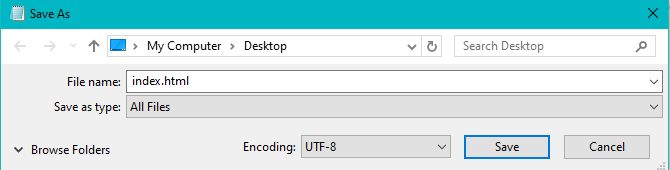
2. Save the HTML page
In Notepad:
- Click File → Save As
- In File name, type:
index.html - In Save as type, select All Files
- In Encoding, select UTF-8
- Click Save
⚠️ Make sure the file is index.html, not index.html.txt.
3. Open it in the browser
Go to the folder where you saved index.html.
Then:
Right-click → Open with → Google Chrome
Or simply double-click the index.html file.
Your browser will display the webpage.
Basic HTML Elements and Tags
- Headings
- Paragraphs
- Lists
- Links
- Images
- Attributes
Headings
Headings can be used to describe the topic they precede and they are defined with the <h1> to <h6> tags. Headings support all the global attributes.
<h1> defines the most important heading.
<h6> defines the least important heading.
Code Example:
<h1>Heading 1 </h1>
<h2>Heading 2 </h2>
<h3>Heading 3 </h3>
<h4>Heading 4 </h4>
<h5>Heading 5 </h5>
<h6>Heading 6 </h6>
Heading 1
Heading 2
Heading 3
Heading 4
Heading 5
Heading 6
Paragraphs
Paragraphs are the most basic HTML element. This topic explains and demonstrates the usage of the paragraph element in HTML.
Code Example:
<p>This is a simple paragraph.</p>
This is a simple paragraph.
Lists
An ordered list can be created with the <ol> tag and each list item can be created with the <li> tag.
An unordered list can be created with the <ul> tag and each list item can be created with the <li> tag.
Code Example:
<ol>
<li>Another Item </li>
<li>Another Item </li>
</ol>

<ul>
<li>Another Item </li>
<li>Another Item </li>
</ul>
- Item
- Another Item
- Yet Another Item
- Item
- Another Item
- Yet Another Item
Links
HTML Links anchor tag, links are created using the <a> anchor tag. The href attribute defines the destination of the link.
Code Example:
Attributes
The HTML elements have Attributes are href, src, alt, target.
<a href="https://google.com" target="_blank" >href & target attribute</a>
<img src="img.png" alt="alternative text">src & alt attribute</a>
Inline Elements
The Inline elements tags are <span>, <strong> and <em>. Strong tag is for bold and em tag for italic text.
<span>Inline elenment</span>
<strong>strong tag</strong>
<em>em tag</em>
Building the semantic HTML elements
What is Semantic HTML?
The Semantic HTML elements introduces meaning to the web content.
Instead of using generic or non-semantic tags like <div>, <span> semantic elements describe the content in a meaningful way.
Semantic elements tags are <img>, <table>, and <article>.
The <header> Represents the header of the page or section.
The <nav> Defines a navigation section.
The <main> Represents the main content of the page.
The <section> A standalone section of related content.
The <footer> Represents the footer of the page or section.
Building a Complete Page Structure
Code Example:
Semantic html page structure looks like this in the code example below.
<!DOCTYPE html>
<html lang="en">
<head>
<meta charset="UTF-8">
<meta name="viewport" content="width=device-width, initial-scale=1.0">
<title>Semantic HTML Page</title>
</head>
<body>
<header>
<h1>My Website</h1>
<nav aria-label="Main navigation">
<a href="#home">Home</a>
<a href="#about">About</a>
<a href="#services">Services</a>
<a href="#contact">Contact</a>
</nav>
</header>
<main>
<section id="home">
<h2>Welcome</h2>
<p>Welcome to my semantic HTML website.</p>
</section>
<section id="about">
<h2>About Us</h2>
<p>We create accessible and well-structured web pages.</p>
</section>
<section id="services">
<h2>Our Services</h2>
<article>
<h3>Web Design</h3>
<p>Modern and responsive website designs.</p>
</article>
<article>
<h3>Web Development</h3>
<p>Clean and semantic HTML, CSS, and JavaScript.</p>
</article>
</section>
<aside>
<h2>Related Information</h2>
<p>This content is related to the main page.</p>
</aside>
<section id="contact">
<h2>Contact</h2>
<address>
Email:
<a href="mailto:hello@example.com">
hello@example.com
</a>
</address>
</section>
</main>
<footer>
<p>© 2026 My Website. All rights reserved.</p>
</footer>
</body>
</html>
My Website
Welcome
Welcome to my semantic HTML website.
About Us
We create accessible and well-structured web pages.
Our Services
Web Design
Modern and responsive website designs.
Web Development
Clean and semantic HTML, CSS, and JavaScript.
Contact
Email: hello@example.comHeader Section
Let’s create a <header> element that contains a website title and navigation menu and inside the <nav>, add a list of links <ul> pointing to different sections of the page.
Main Content
Use a <main> element for the primary content and inside the <main> tag, use <section> tags to divide the content logically product section, service section.
Footer Section
At the bottom of web page add a <footer> element that includes some footer information copyright.
Common Mistakes & FAQs
❌ Common Mistakes
1. Forgetting DOCTYPE:
Always start your HTML document with
<!DOCTYPE html>.
2. Unclosed Tags:
Remember to properly close tags such as
<p> and <h1>.
3. Wrong File Extension:
Save your webpage using the .html extension.
4. Missing Alt Text:
Add an alt attribute to images for better accessibility.
❓ Frequently Asked Questions
What is HTML?
HTML stands for HyperText Markup Language and is used to structure
webpages.
Is HTML easy for beginners?
Yes. HTML is one of the easiest technologies to start with when
learning web development.
What do I need to write HTML?
You only need a text or code editor and a web browser.
What should I learn after HTML?
CSS is a great next step for styling your webpages, followed by
JavaScript for interactivity.

About Techanees
Techanees is a technology platform sharing simple tutorials, useful guides, web development tips, and the latest tech updates for beginners and enthusiasts.
really an amazing article
excellent and easy article